
1. Your Secret Weapon on the SAT
The Desmos graphing calculator is built directly into the digital SAT. It's not an add-on — it IS your calculator. And most students barely scratch the surface of what it can do.
Here's the key insight: every algebraic solution is just shapes crossing on a graph. Two equations are equal? That's two lines intersecting. Solving a quadratic? That's a parabola hitting the x-axis.
Finding the value of k that gives "no solution"? That's two lines that never meet.
Once you get this, Desmos basically solves problems for you. You can check answers in seconds, find solutions visually when algebra gets messy, and skip entire categories of mistakes.
| Traditional Approach | Desmos Shortcut |
|---|---|
| Solve systems by elimination/substitution | Graph both lines, click intersection |
| Factor quadratics to find roots | Graph the parabola, read the x-intercepts |
| Calculate mean by hand (add, divide) | Type mean(15, 22, 18, 31, 24, 19) |
| Memorize slope-intercept conversions | Type the equation directly in any form |
| Guess-and-check for unknown constants | Use a slider to dial in the exact value |
Quick Reference: When to Use What
Use this table as your cheat sheet. Over time, you'll know instantly when to reach for Desmos vs. when to solve by hand.
| Problem Type | Algebra Effort | Desmos Speed | Verdict |
|---|---|---|---|
| Single-variable equations | High | Instant | GRAPH IT |
| Systems of equations | High | Instant | GRAPH IT |
| Quadratics & intercepts | Medium | Instant | GRAPH IT |
| Inequality boundaries | High | Instant | GRAPH IT |
| Mean / Median | Medium | Instant | TYPE IT |
| Evaluating expressions | Low–Med | Instant | TYPE IT |
| Circle formula parsing | Low | Slow | PEN & PAPER |
| Linear no-solution (find k) | Low | Imprecise | PEN & PAPER |
| Equivalent expressions | Medium | Clunky | PEN & PAPER |
| Simple arithmetic | Low | Overkill | PEN & PAPER |
The best SAT takers don't just know how to use Desmos — they know when. Practice the techniques AND the judgment calls. That's what separates a 650 from a 750.
2. Desmos as a Calculator
Most students don't realize: Desmos IS your only calculator on the digital SAT. There's no separate scientific calculator. Everything happens in Desmos.
Basic arithmetic: Type expressions directly into the expression line. Desmos evaluates them instantly — just type and read the result.
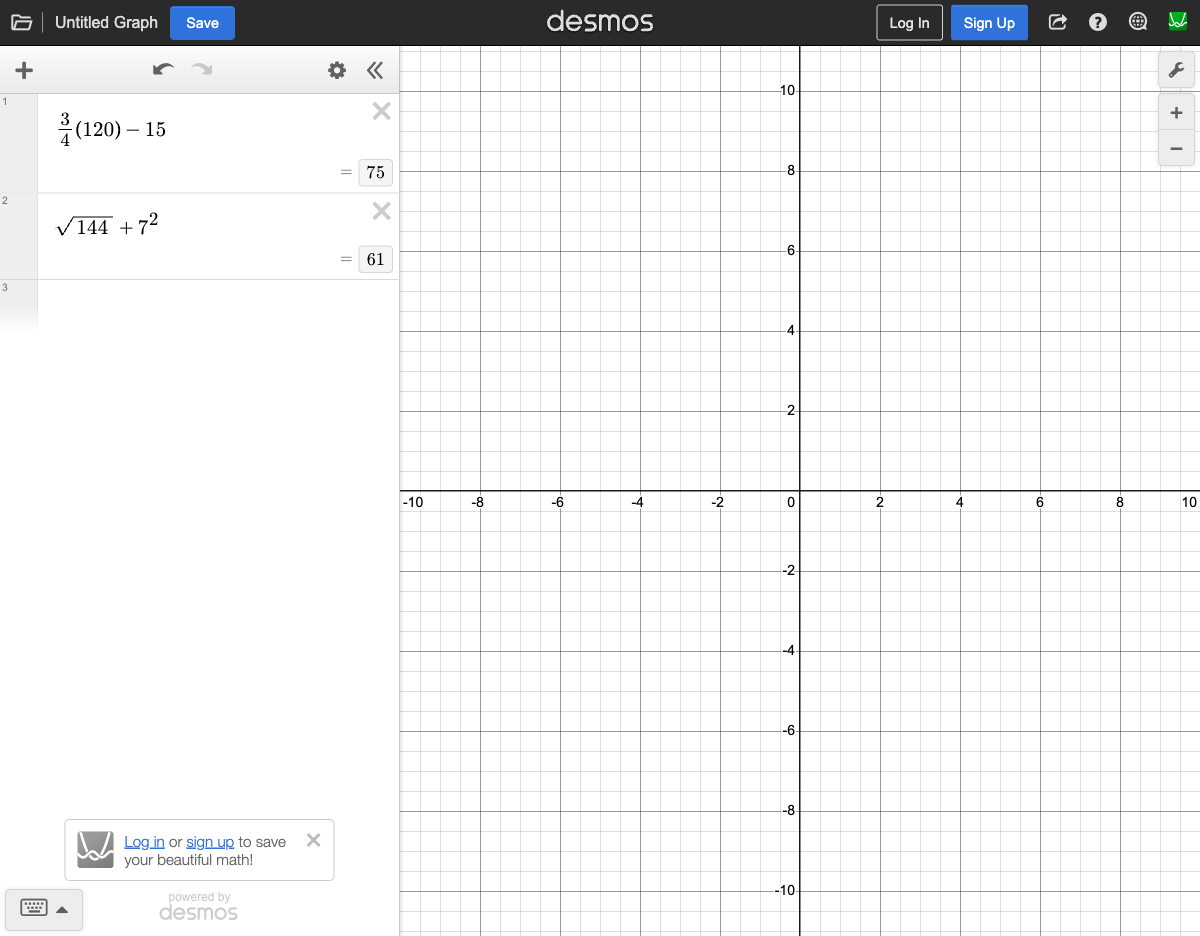
Fractions: Desmos handles fractions natively. Type (2/3) + (5/8) and get the exact decimal. Need a discriminant? Type the whole thing: 7^2 - 4*3*2.
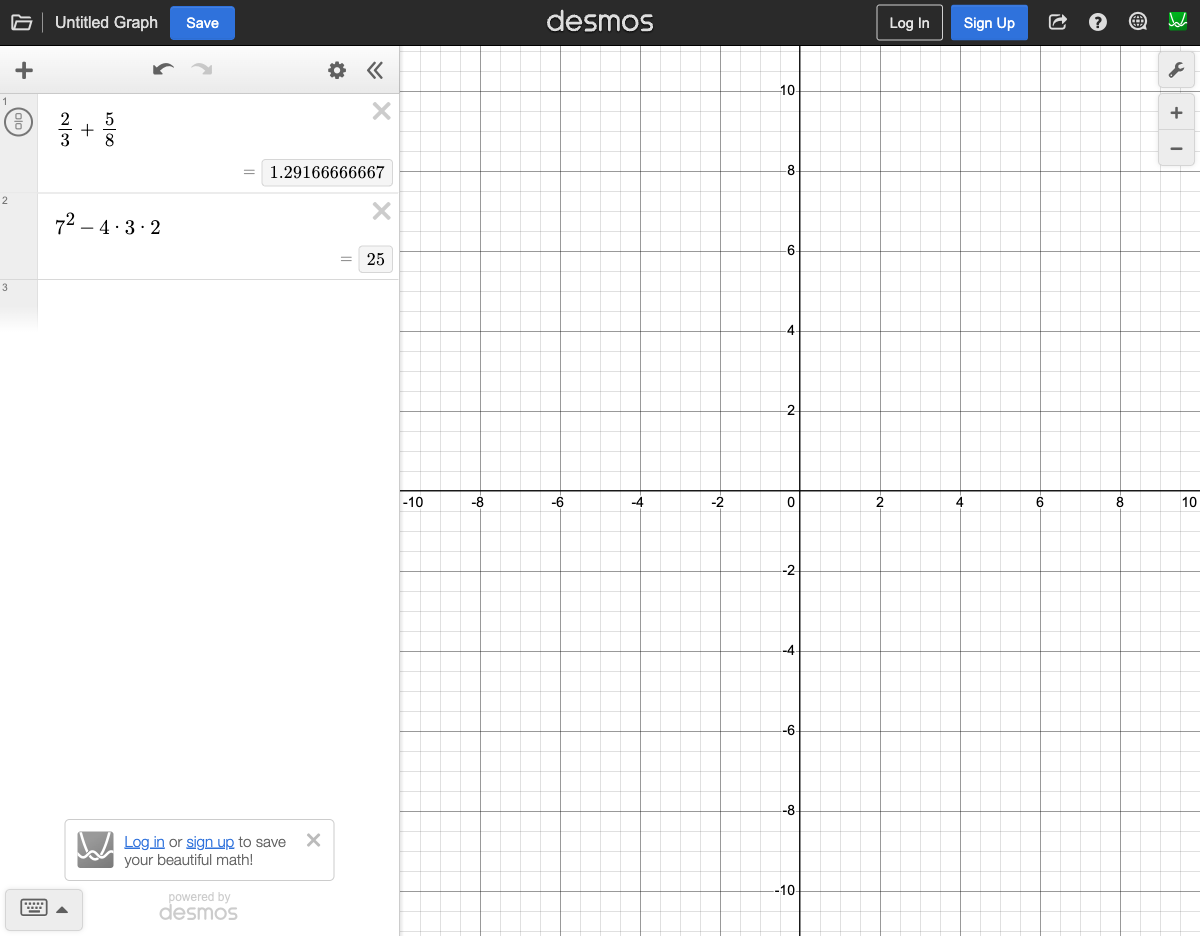
Other useful operations:
sqrt(144)— square rootnthroot(27, 3)— cube root (= 3)7^2— exponents|3x - 7|— absolute value0.15 * 340— percentages (15% of 340)
3. Input Rules: Talking to the Graph
Desmos only understands x and y. If the SAT problem uses different variables — like a, n, t, or p — you need to swap them in.
- Replace the independent variable with x
- Replace the dependent variable (if any) with y
- Type the equation into Desmos exactly as modified
Copy-paste trick: You can often copy equation text directly from the SAT problem and paste it into Desmos. This kills transcription errors — one of the most common mistakes under pressure.
Color-coding: Each equation gets its own color automatically. When you graph 5 equations, the colors help you match each line to its expression.
* for multiplication (e.g., 2*x not 2x in some contexts), and make sure parentheses are balanced.4. The Split Method: Your #1 Move
This is the single most powerful Desmos technique for the SAT. Take any equation and split it at the equals sign into two separate functions:
- Take the left side of the equation → graph as y = [left side]
- Take the right side of the equation → graph as y = [right side]
- The x-coordinate of the intersection point is your answer
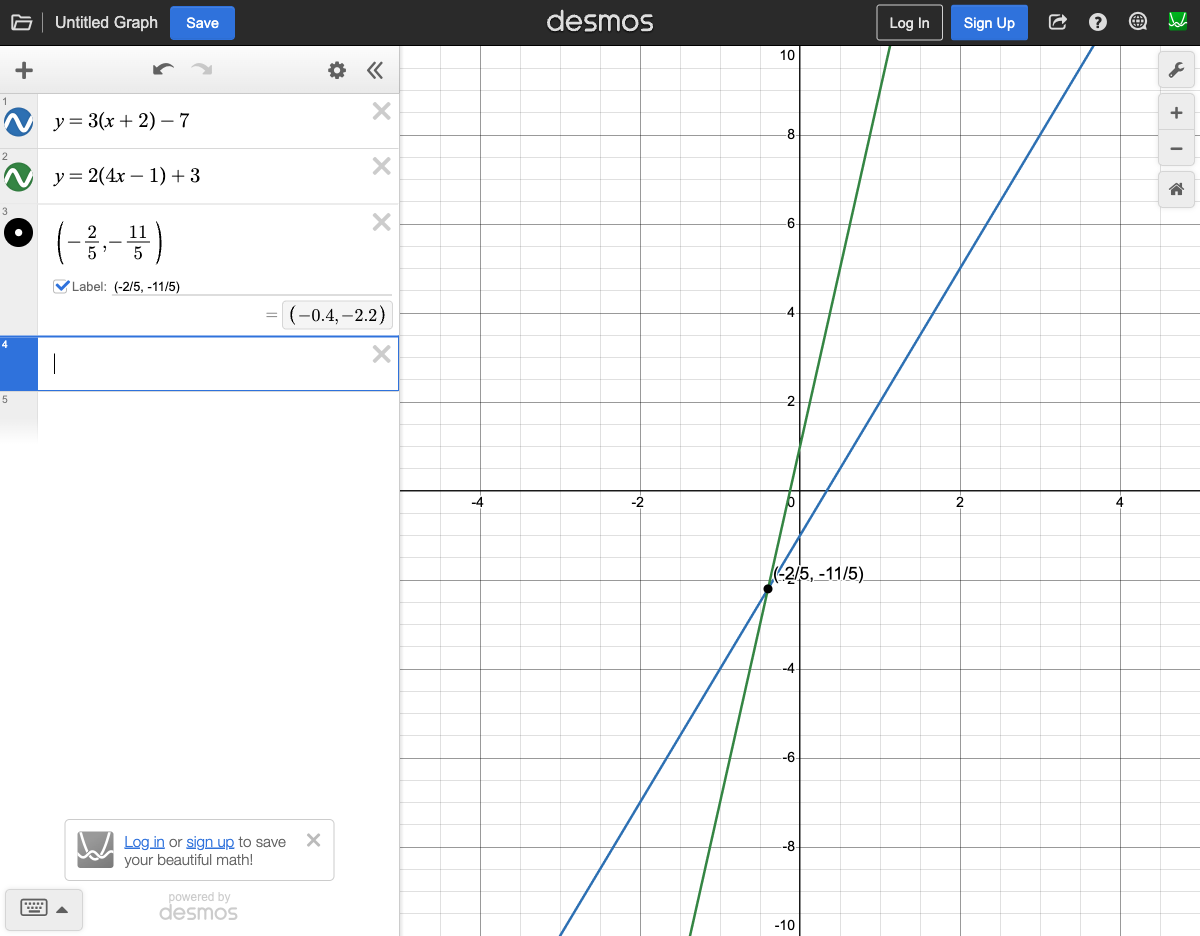
Example: Solve 3(x+2) - 7 = 2(4x-1) + 3
Graph y = 3(x+2) - 7 and y = 2(4x-1) + 3. The two lines intersect — the x-value at that point is the answer.
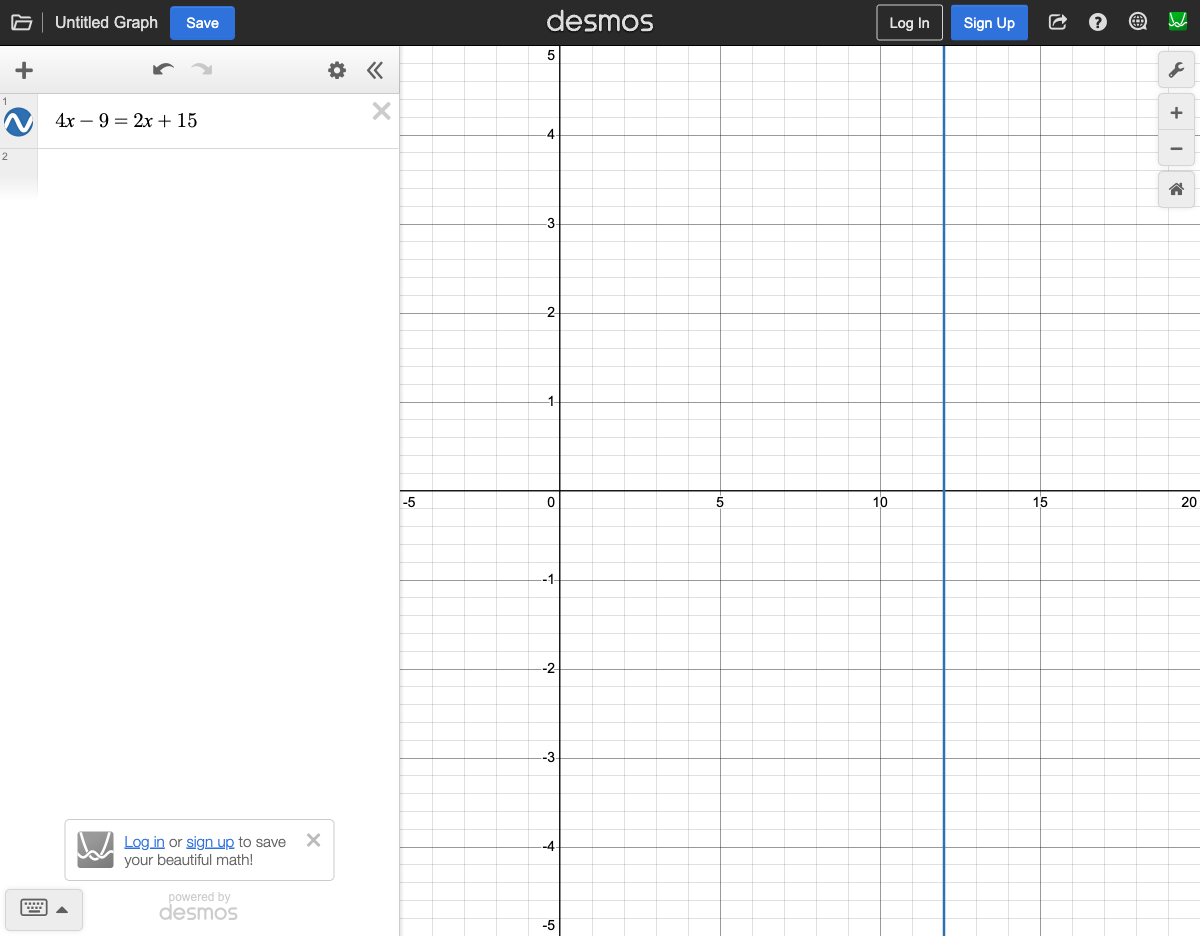
Alternative: You can also type the full equation directly. Typing 4x - 9 = 2x + 15 makes Desmos draw a vertical line at the solution (x = 12).
The split method works for any equation — linear, quadratic, absolute value, square root. If you can split it at the equals sign, Desmos can solve it.
5. Systems of Equations: Just Click the Intersection
Two equations, two unknowns. The textbook way? Elimination, substitution, carefully multiplying equations... lots of places to mess up.
The Desmos way: graph both, click the intersection. Done.
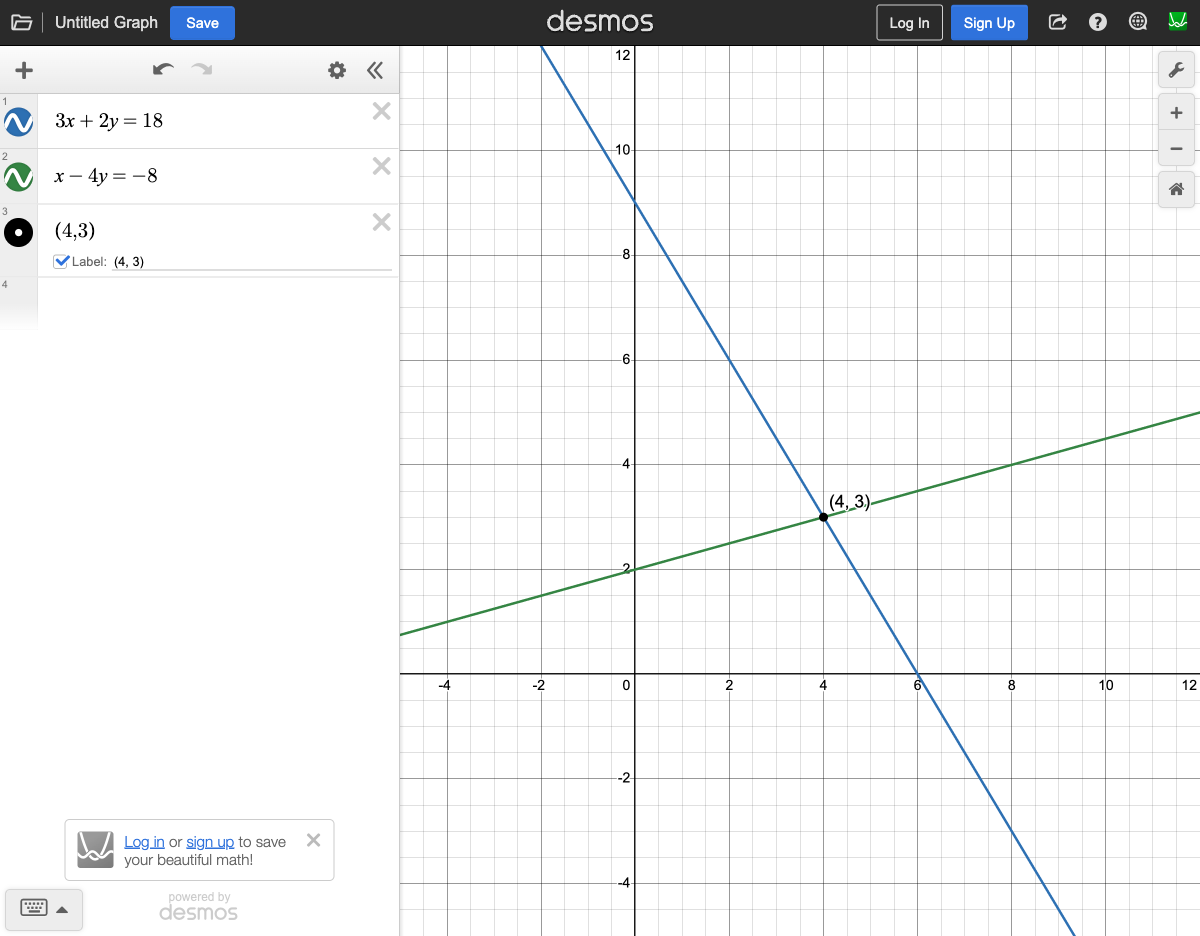
Example: Solve 3x + 2y = 18 and x - 4y = -8. Type both in — you don't need slope-intercept form. Desmos takes any form. The intersection gives you (4, 3).
6. Inequalities: The Zone of Truth
Desmos handles inequalities beautifully — it shades the valid region automatically. When you have multiple inequalities, the darkest overlap is your answer zone.
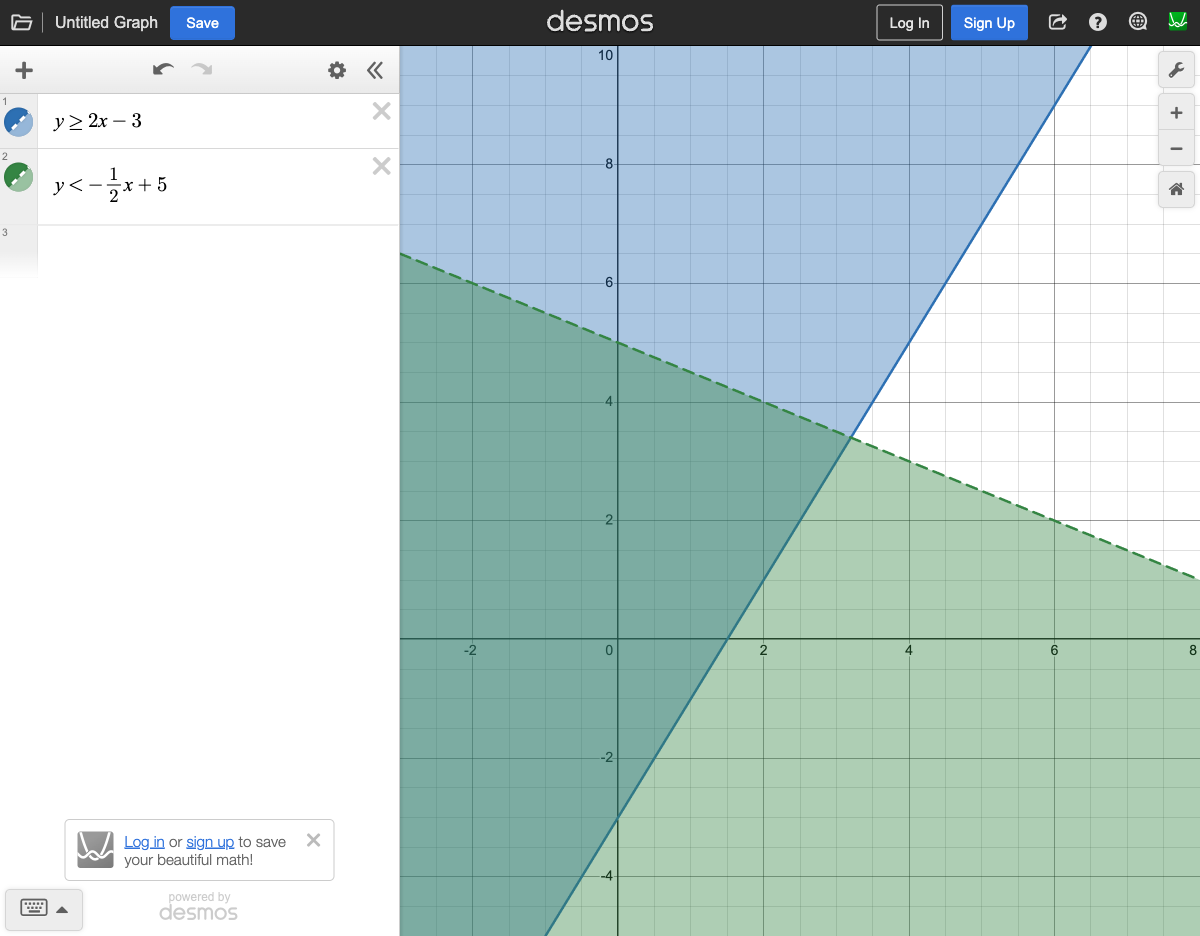
Got a word problem with rules? Type each rule as an inequality. The dark shaded overlap is your answer zone — any point inside it works.
7. Quadratics in 2 Seconds
Type any quadratic and Desmos shows you everything: vertex, x-intercepts (roots), and y-intercept. What takes minutes with the quadratic formula takes 2 seconds here.
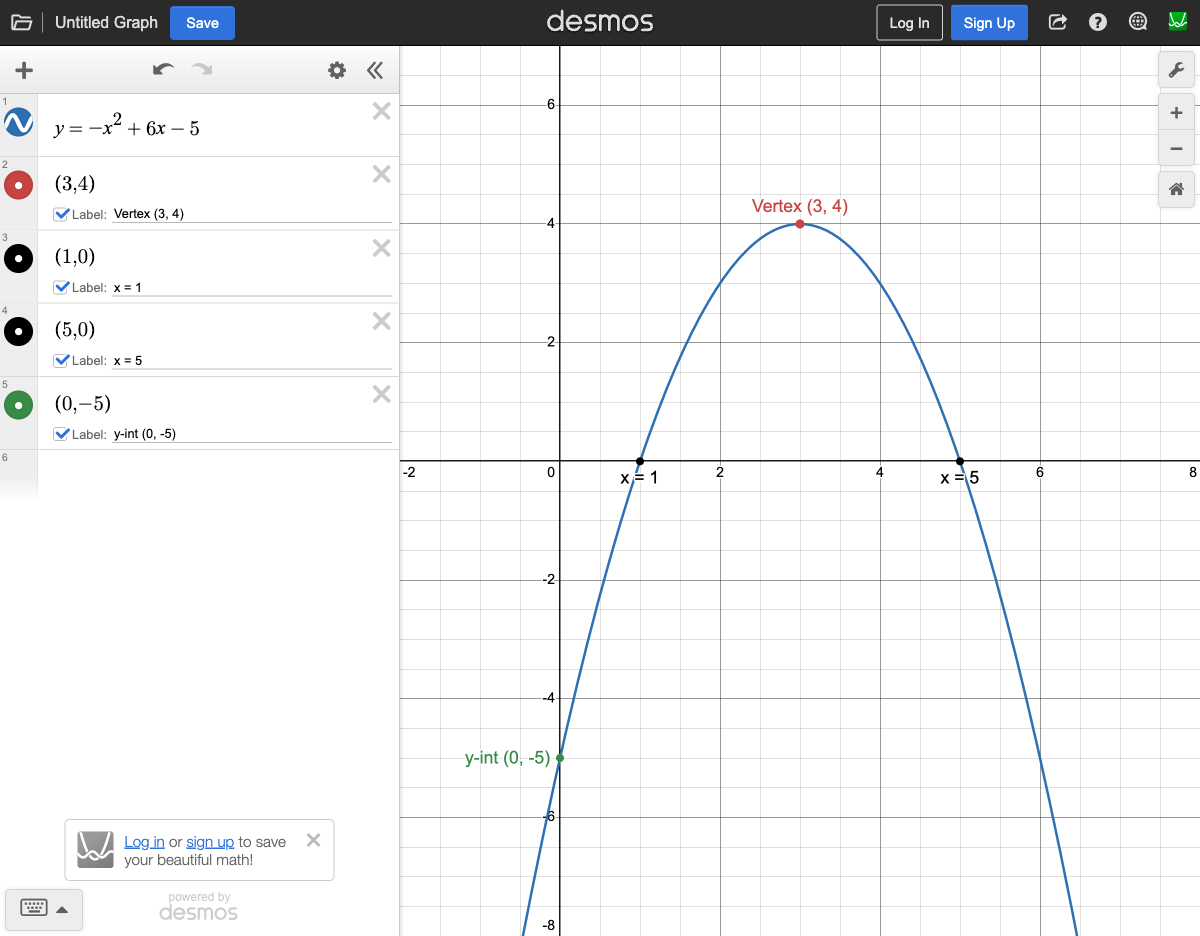
The SAT loves asking "What is the maximum value?" or "Where does the function hit its minimum?" With Desmos, you just click the peak or valley.
Key points to look for:
- Vertex — the peak (if a < 0) or valley (if a > 0)
- x-intercepts — where the parabola crosses the x-axis (the "roots" or "zeros")
- y-intercept — where the parabola crosses the y-axis (just the constant term)
- Axis of symmetry — the vertical line through the vertex
8. Sliders: Dial In the Answer
When a problem has an unknown constant (like c, k, or a), Desmos automatically creates a slider. Drag it and watch the graph change in real time.
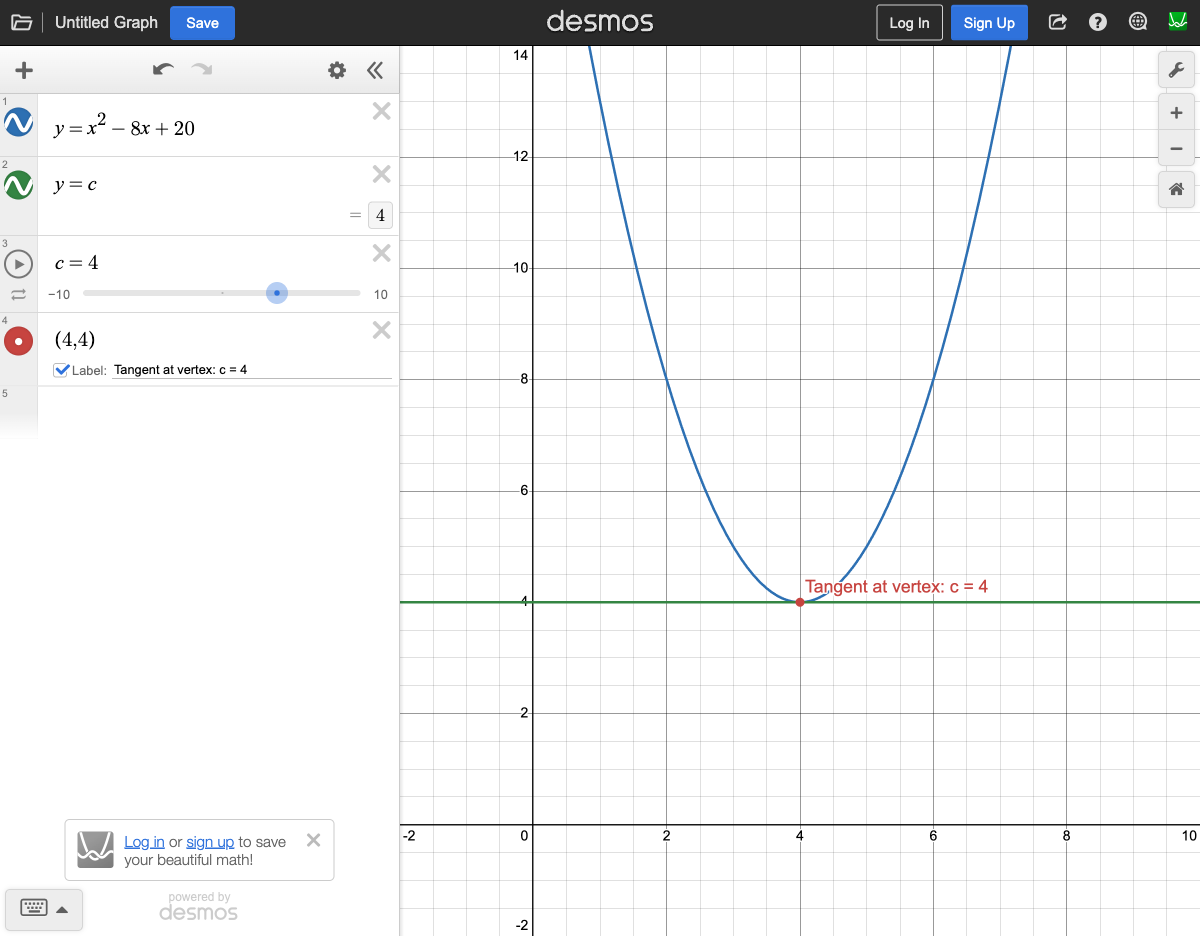
Example: "The line y = c intersects y = x² - 8x + 20 at exactly one point. What is the value of c?"
- Graph the quadratic: y = x² - 8x + 20
- Type y = c — Desmos creates a slider
- Drag the slider until the horizontal line just touches the vertex
- Read the value: c = 4
Pro tip: If Desmos doesn't offer a slider, rewrite as y = 0x + c. You can click the slider endpoints to change the range and step size.
9. Parallel & Perpendicular: See It Instantly
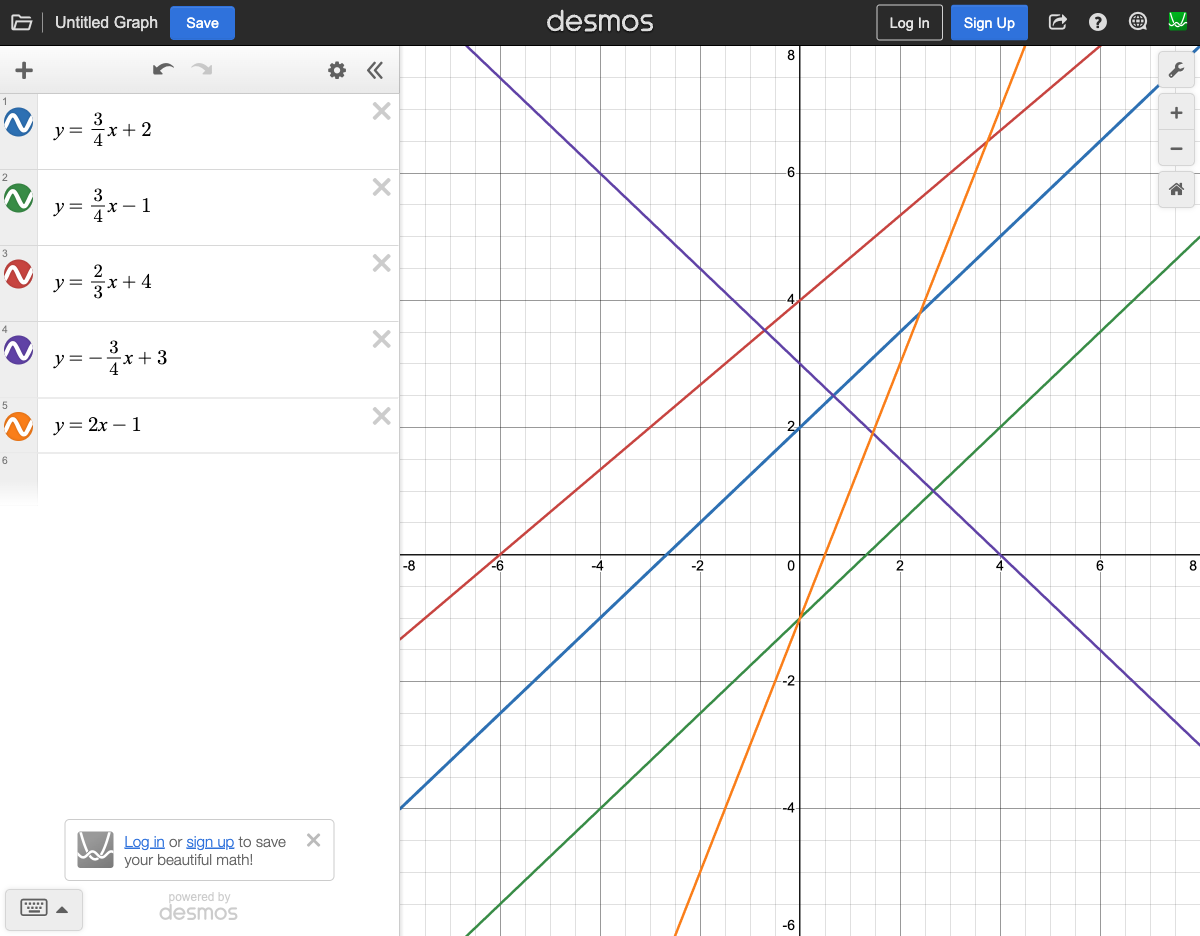
Parallel check: Graph the target line plus all four answer choices. Parallel lines never cross — you'll spot them immediately.
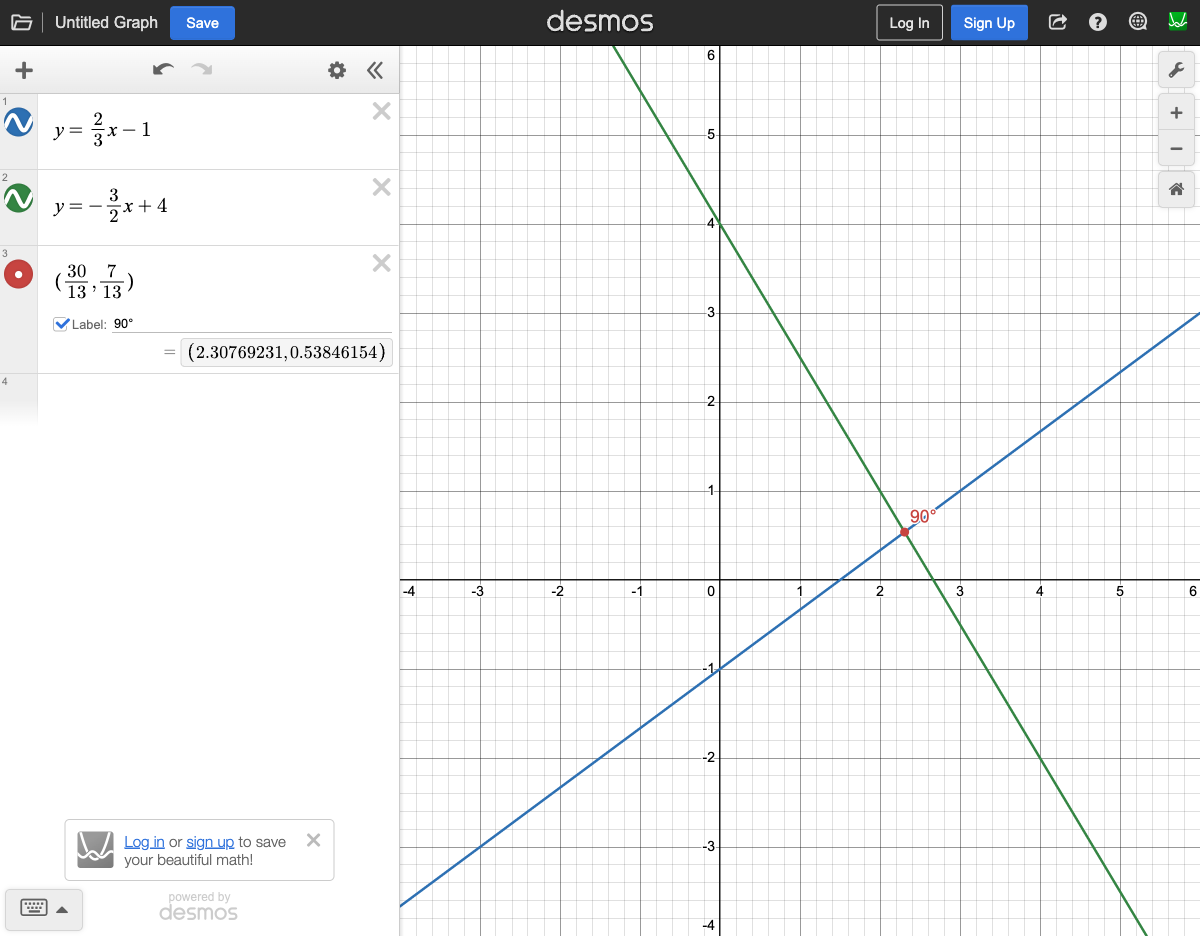
Perpendicular check: Perpendicular lines cross at a clean 90° angle. Quick rule: flip the fraction and change the sign. Slope of 2/3? The perpendicular slope is -3/2.
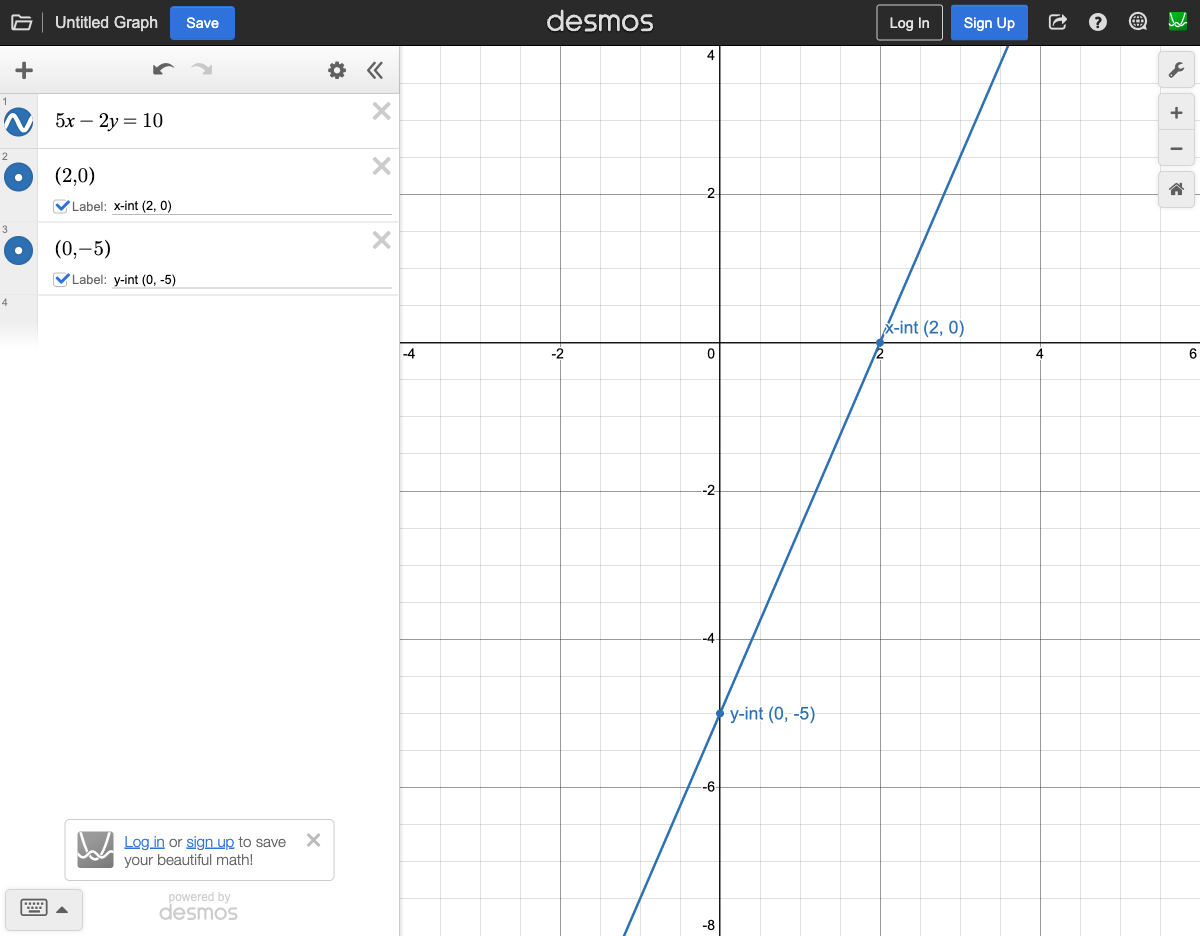
Standard form reveal: Don't waste time converting 5x - 2y = 10 to slope-intercept form. Just type it in — Desmos graphs it instantly.
10. Stats Commands: Just Type It
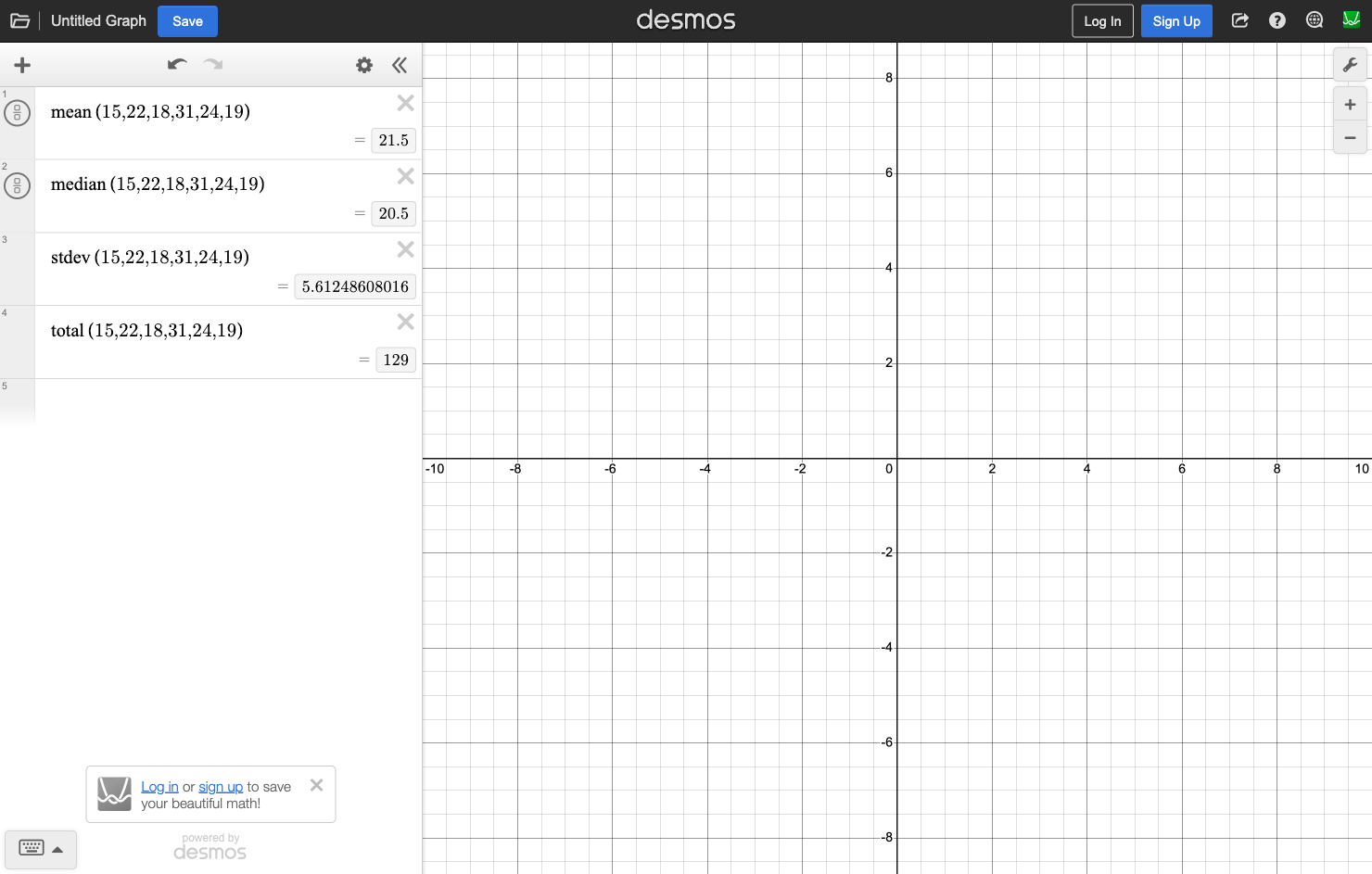
Desmos has built-in stats functions. No need to sort data, count elements, or calculate by hand.
Key commands:
mean(15, 22, 18, 31, 24, 19)— average (21.5)median(15, 22, 18, 31, 24, 19)— middle value (20.5)stdev(15, 22, 18, 31, 24, 19)— standard deviationtotal(15, 22, 18, 31, 24, 19)— sum of all values (129)length(15, 22, 18, 31, 24, 19)— count of values (6)
11. Circles: Type and See
Type (x+3)² + (y-5)² = 36 and you instantly see the full circle — center and radius right there on screen.
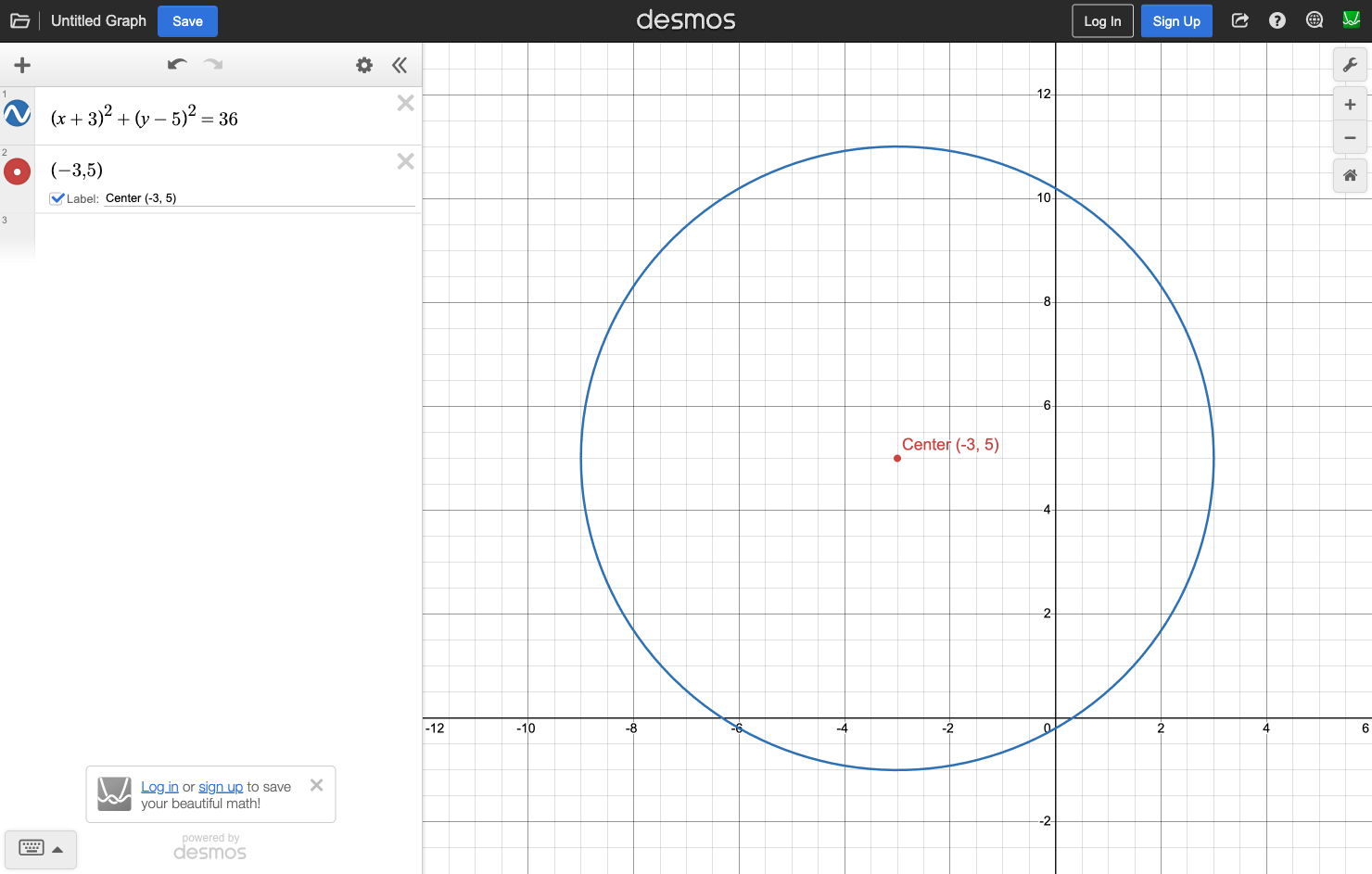
"Which point lies on the circle?" Graph it and check visually. "What's the range of x-values?" Look at the leftmost and rightmost points.
From (x+3)² + (y-5)² = 36 you can read: center = (-3, 5), radius = √36 = 6. Leftmost x = -9, rightmost x = 3.
12. When NOT to Use Desmos
This might be the most important section in the entire guide. The move is NOT to graph everything. Smart students know when to put the tool down.
Test designers build traps to punish students who blindly graph. Here's what to watch for:
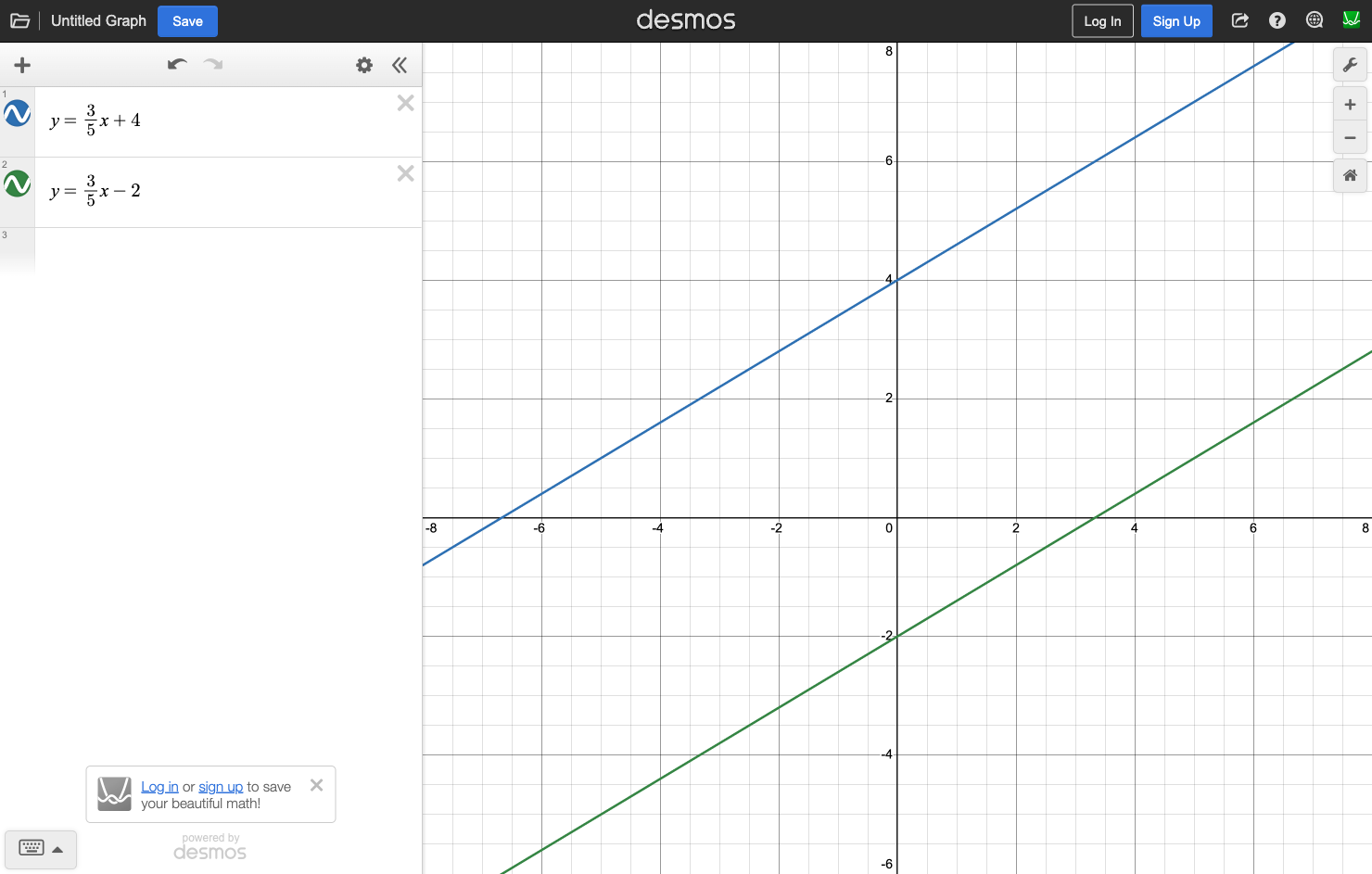
Linear systems with no solution / finding k
"For what value of k does the system have no solution?" Don't try to eyeball parallel lines with sliders — you can't get exact values like k = 15/7 visually. Use algebra here.
Circle center & radius in standard form
If the equation is (x+5)² + (y-8)² = 121, just read it: center = (-5, 8), radius = 11. Takes 3 seconds — no graphing needed.
Equivalent expressions / factoring
Don't graph 5x³ - 45x and all 4 choices as curves — that's 60+ seconds. Just factor: 5x(x² - 9) = 5x(x-3)(x+3). Five seconds.
Reading slope from slope-intercept form
If it says y = (3/4)x + 2, the slope is right there: 3/4. Just read it.
Simple arithmetic you can do in your head
Don't graph 2x + 1 = 7. Just solve x = 3 in your head. Faster than typing it.